
Appointment Reminder Text: 20 Examples You Can Copy
On this page

An appointment reminder text is a short message sent before a booking that tells the client who you are, when their appointment is, and how to change it. Send one the day before and a shorter one a few hours ahead, keep it under 160 characters, and only text clients who agreed to it.
Below are 20 copy-ready examples for spas, massage therapists, barbershops, nail, lash and tattoo studios, plus the timing, consent rules and mistakes that decide whether a reminder actually works.
What every appointment reminder text needs
A good appointment reminder text answers three questions in one glance: who is texting, when is the booking, and what do I do if I cannot make it. Everything else is optional.
Clients read these messages on a lock screen, often between other things. If the date is buried after two lines of pleasantries, it gets missed. Put the business name first and the time early.
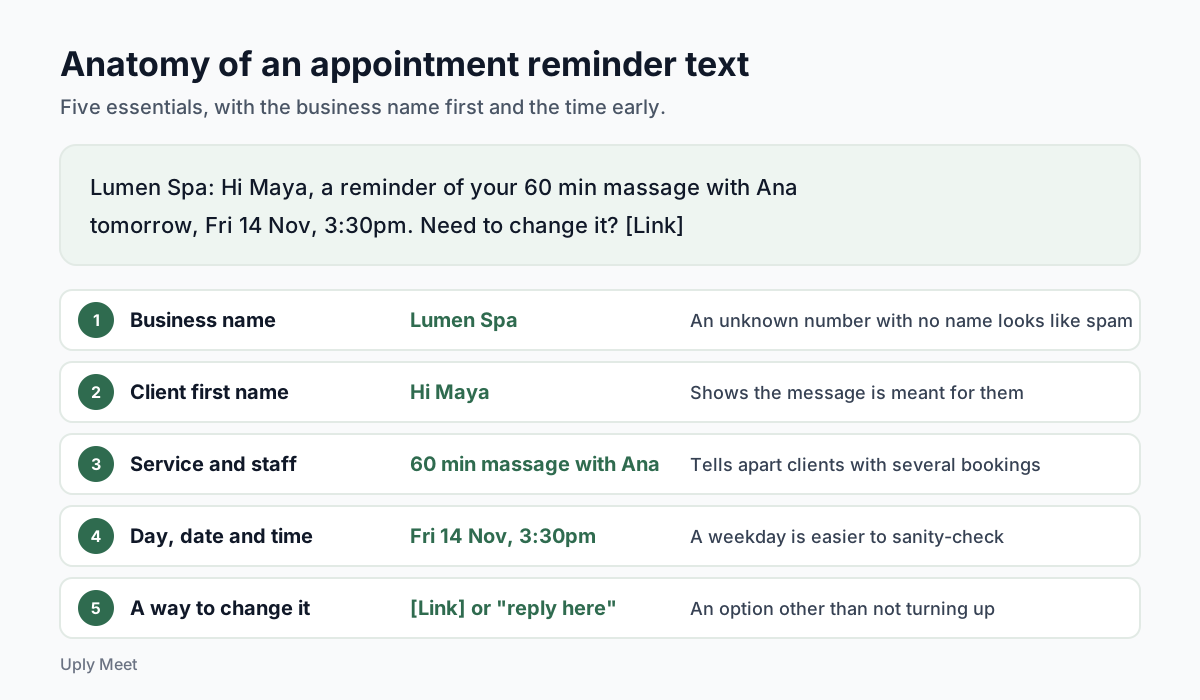
The five essentials
| Element | Example | Why it matters |
|---|---|---|
| Business name | "Lumen Spa" | An unknown number with no name looks like spam. |
| Client first name | "Hi Maya" | Shows the message is meant for them, not a blast. |
| Service and staff | "60 min massage with Ana" | Helps clients with several bookings tell them apart. |
| Day, date and time | "Fri 14 Nov, 3:30pm" | A weekday is easier to sanity-check than a date alone. |
| A way to change it | A reschedule link or "reply here" | Gives clients an option other than simply not turning up. |
Keep it short enough for one message
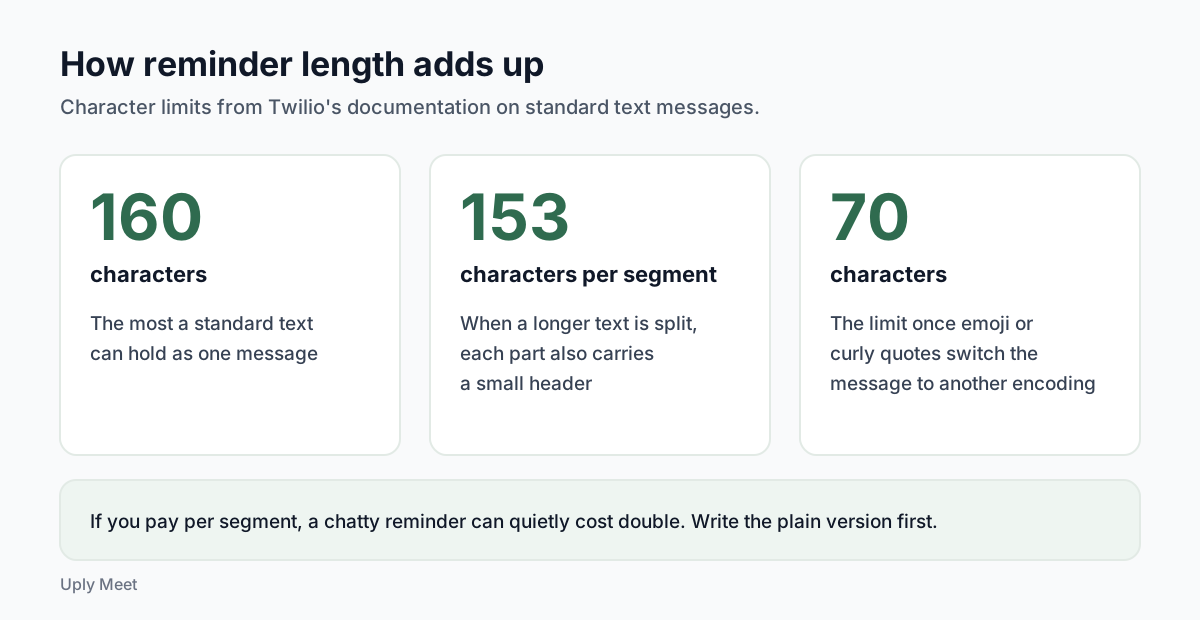
Length is not only about style. According to Twilio's documentation, standard text messages longer than 160 characters are split into segments, and each segment carries 153 characters plus a small header. Emoji or curly quotes switch the message to a different encoding that cuts the limit to 70 characters.
If you pay per segment, a chatty reminder can quietly cost double. Write the plain version first, then add warmth only if it still fits.
When to send text reminders
Most no-shows are not rude. They are forgotten. A Cochrane review of mobile phone messaging reminders names patients' forgetfulness as one of the main reasons for missed appointments, and found that text reminders improved attendance compared with no reminder at all, with a risk ratio of 1.14 (Gurol-Urganci et al., Cochrane, 2013).
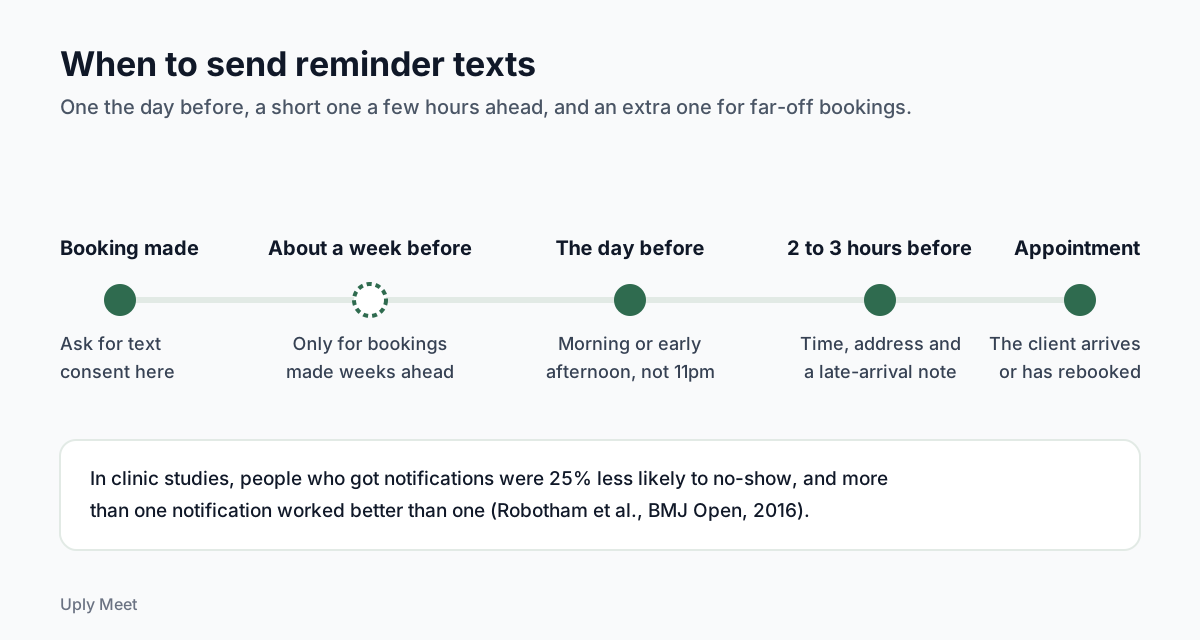
Timing and repetition matter as much as wording. In a meta-analysis of 21 randomised studies, people who received notifications were 25% less likely to no-show (15% vs 21%), and multiple notifications worked better than a single one (Robotham et al., BMJ Open, 2016). These were clinic studies, not salons, so treat them as a direction rather than a promise for your studio.
The day before
This is the workhorse. It gives the client time to rearrange their day, and it gives you time to fill the gap if they cancel. Send it in the morning or early afternoon, not at 11pm.
A few hours before
A second, shorter message two to three hours ahead catches people who saw the first one and then forgot. Keep it to time, address and a late-arrival note.
For bookings made weeks ahead
Long gaps are risky. A systematic review of 105 studies found high lead time and a history of previous no-shows were the most commonly reported predictors of missed appointments (Dantas et al., Health Policy, 2018). For a tattoo session booked two months out, add a reminder a week before.
20 appointment reminder text examples you can copy
Every appointment reminder text below is an example. Replace the parts in square brackets with your own details, and cut anything that does not apply to your studio. With a short business name and link filled in, each one stays under 160 characters.
Standard reminders
- Day-before reminder: "Hi [Name], a reminder of your [Service] at [Business] tomorrow, [Day] at [Time]. Need to change it? [Link]"
- Same-day reminder: "Hi [Name], see you today at [Time] for your [Service] at [Business], [Address]. Running late? Reply here."
- Week-ahead reminder: "Hi [Name], your [Service] at [Business] is next [Day] at [Time]. Plans changed? Move it here: [Link]"
- Short reminder: "[Business]: [Service] on [Day] at [Time]. Change or cancel: [Link]"
Friendly reminder text messages
A friendly tone suits regulars and small studios. Keep the facts in the first line so the warmth does not hide the time.
- Warm reminder: "Hi [Name]! Just a friendly reminder that we have you booked for [Service] on [Day] at [Time]. We are looking forward to it."
- Regular client: "Hey [Name], your usual [Service] with [Staff] is set for [Day] at [Time]. See you then!"
- First visit: "Hi [Name], welcome to [Business]! Your first visit is [Day] at [Time]. We are at [Address], parking is [Parking note]."
By business type
These add one practical note for each type of service. Swap in the prep advice you actually give clients.
- Day spa: "Hi [Name], your [Treatment] at [Business] is [Day] at [Time]. Please arrive 10 minutes early to settle in. Change it: [Link]"
- Massage therapist: "Hi [Name], your [Length] massage with [Staff] is [Day] at [Time]. Wear something comfortable. Need to move it? [Link]"
- Barbershop: "Yo [Name], your cut with [Barber] is [Day] at [Time]. Chair is yours for [Length]. Can't make it? [Link]"
- Nail studio: "Hi [Name], your [Nail service] at [Business] is [Day] at [Time]. If you have a soak-off, tell us here so we plan the time."
- Lash studio: "Hi [Name], your lash [Fill or full set] is [Day] at [Time]. Please come with clean lashes and no eye makeup. Change it: [Link]"
- Tattoo studio: "Hi [Name], your session with [Artist] is [Day] at [Time]. Eat beforehand and bring your ID. Questions? Reply here."
Confirmation, policy and rescheduling
- Ask to confirm: "Hi [Name], can you confirm your [Service] on [Day] at [Time]? Reply YES to confirm or use [Link] to change it."
- Policy reminder: "Hi [Name], see you [Day] at [Time]. A reminder: changes need [Hours] hours notice. Reschedule here: [Link]"
- Waitlist offer: "Hi [Name], a [Service] slot opened [Day] at [Time]. Want it? Reply YES and we will book you in."
- Reschedule done: "Hi [Name], you are now booked for [Service] on [New day] at [New time]. Your old time has been released."
Missed visits and follow-ups
These are not strictly reminders, but they close the loop. Keep the missed-appointment message kind. A shaming text rarely brings anyone back.
- Missed appointment: "Hi [Name], we missed you today at [Time]. No worries, things happen. Book a new time here: [Link]"
- Thank you: "Thanks for visiting [Business] today, [Name]! Ready for your next [Service]? [Link]"
- Rebooking nudge: "Hi [Name], it has been [Weeks] weeks since your last [Service]. Want to book your next one? [Link]"
Consent, opt-out and privacy rules for reminder texts
Before you send text message reminders from a tool, check the rules where you and your clients live. This is general information, not legal advice.
In the United States, the FCC explains that texts sent to a mobile phone with an autodialer are banned unless the owner gave consent first. Commercial texts require written consent, while consent for informational texts may be oral. The same page notes people may opt out at any time and in any reasonable manner.
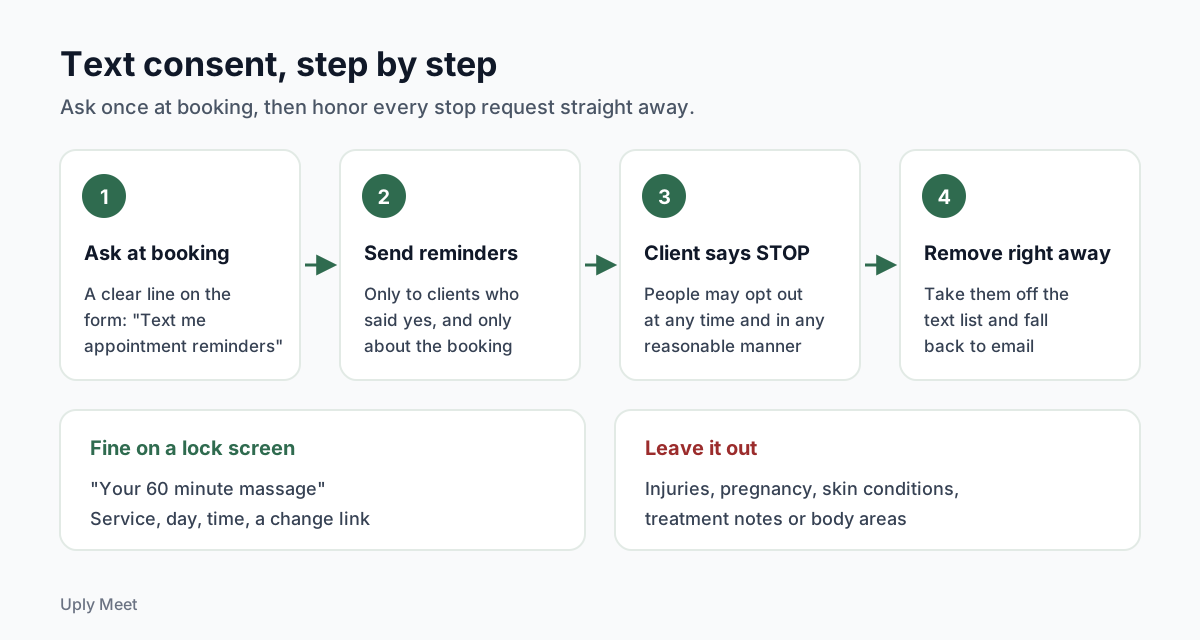
Ask at booking, then honor stops
The simplest habit is to ask for permission on the booking form, with a clear line such as "Text me appointment reminders". If someone replies STOP, take them off the list straight away and fall back to email.
Leave sensitive details out
Lock screens are public. Do not put treatment notes, health conditions or body areas in a reminder. In the EU, GDPR Article 9 treats data concerning health as a special category, and Article 3 can apply to businesses outside the EU that offer services to people in it.
"Your 60 minute massage" is fine. Anything that mentions an injury, a pregnancy or a skin condition is not.
Text message reminders vs email reminders
Here is our honest take: the channel matters less than people think. A 2023 review of 61 studies found reminders were by far the most tested way to cut missed appointments, with significant evidence for reminders sent by text, phone or mail (Werner et al., BMC Health Services Research, 2023). Most of the strong numbers come from texts, simply because that is what most trials tested.
| Question | Text reminders | Email reminders |
|---|---|---|
| Cost per message | Usually paid per segment | Usually included in your tool |
| Length | Short, 160 characters per segment | Room for address, policy and a map |
| What you need from the client | Mobile number and consent | Email address |
| Calendar file | Not practical | Can attach an .ics file |
| Weak spot | Costs add up, consent rules | Can land in spam or be read late |
Email has one quiet advantage: it is transactional by nature. The FTC's CAN-SPAM guide explains that a message whose primary purpose is transactional, such as confirming a booking the client already agreed to, is exempt from most of the Act's provisions. Keep promotions out of your reminders so they stay that way.
Uply Meet sends email reminders 24 hours and 2 hours before every booking by default, with a link clients use to reschedule or cancel without an account. Text message reminders are not available yet and are marked Coming soon. You can read how the appointment reminder emails work, and the wording ideas in this guide fit them as well.
Common reminder text mistakes to avoid
- No business name. "Reminder: tomorrow 3pm" from an unknown number gets ignored or reported.
- Only one reminder for a far-off booking. Research on clinic reminders found more than one works better than one.
- No way to change the time. If moving a booking means a phone call during work hours, some clients just do not show.
- Time zone confusion. For online or travelling clients, state the time zone or send times in their local time.
- Policy as a threat. Mention your notice period calmly. Save the details of a no show fee for your booking page and confirmation.
- Sending at night. A 6am or midnight text annoys more than it helps.
A contrarian point to finish: do not over-polish your appointment reminder text. Clients rarely remember the exact message. They remember whether it arrived on time and whether changing the booking was easy.
If you are still taking bookings by phone or direct message, reminders are much easier to automate once clients book online. A simple appointment booking page gives every client the same confirmation and the same reminders without you typing them out.
Frequently asked questions
What should an appointment reminder text say?
Your business name, the client's first name, the service, the day, date and time, and a way to change the booking such as a link or "reply here". Keep it to one or two short sentences.
How far in advance should I send a reminder text?
A common pattern is one reminder the day before and a short one two to three hours ahead. For bookings made weeks in advance, add one about a week before. Clinic research found more than one reminder works better than one.
Can I send free text reminders?
You can type reminders by hand from your own phone at no extra cost, but it takes time every day and is easy to forget on busy days. Automated text tools usually charge per message, while email reminders are often included in booking software.
Do I need permission to text appointment reminders?
Often yes. In the United States the FCC says texts sent with an autodialer need the owner's prior consent, and people can opt out at any time. Ask for permission on your booking form and check the rules in your country.
Does Uply Meet send text message reminders?
Not yet. Uply Meet sends email reminders 24 hours and 2 hours before each booking, with a link to reschedule or cancel. Text message reminders are marked Coming soon.
How long should an appointment reminder text be?
Aim for under 160 characters. According to Twilio's documentation, longer standard texts are split into segments of 153 characters each, and emoji or curly quotes switch the message to an encoding that cuts the limit to 70 characters. If you pay per segment, a long reminder can cost double.
What should I leave out of a reminder text?
Anything sensitive. Lock screens are public, so leave out treatment notes, health conditions and body areas. "Your 60 minute massage" is fine, while a mention of an injury, a pregnancy or a skin condition is not. In the EU, GDPR Article 9 treats data concerning health as a special category.
What should I do when a client replies STOP?
Take them off your text list straight away and send their reminders by email instead. The FCC notes that people may opt out at any time and in any reasonable manner.
Sources
- Robotham et al. (2016), Using digital notifications to improve attendance in clinic: systematic review and meta-analysis, BMJ Open
- Gurol-Urganci et al. (2013), Mobile phone messaging reminders for attendance at healthcare appointments, Cochrane Database of Systematic Reviews
- Dantas et al. (2018), No-shows in appointment scheduling: a systematic literature review, Health Policy
- Werner et al. (2023), Behavioural economic interventions to reduce health care appointment non-attendance, BMC Health Services Research
- Twilio Docs: text message character limit and segments
- FCC: Stop Unwanted Robocalls and Texts
- Regulation (EU) 2016/679 (GDPR), EUR-Lex official text
- FTC: CAN-SPAM Act, A Compliance Guide for Business
- Reddit r/MassageTherapists: thread on actual no-show rates