
Appointment Notification: Types, Timing and Examples
On this page
An appointment notification is any automatic message about a booking: the confirmation sent when it is made, reminders before the visit, notices when it moves or is cancelled, and the alert the business gets about new bookings. Most spas, barbershops and studios need five or six of them, each sent at a fixed moment and each doing one job.
This guide covers every type, when to send it, which channel fits, and copy-ready templates you can adapt today.
What counts as an appointment notification
Think of each appointment notification as part of a short series that follows one booking from start to finish. Each message has one job. When a message tries to do two jobs, such as confirming a booking and selling a gift card, the important part gets skimmed.
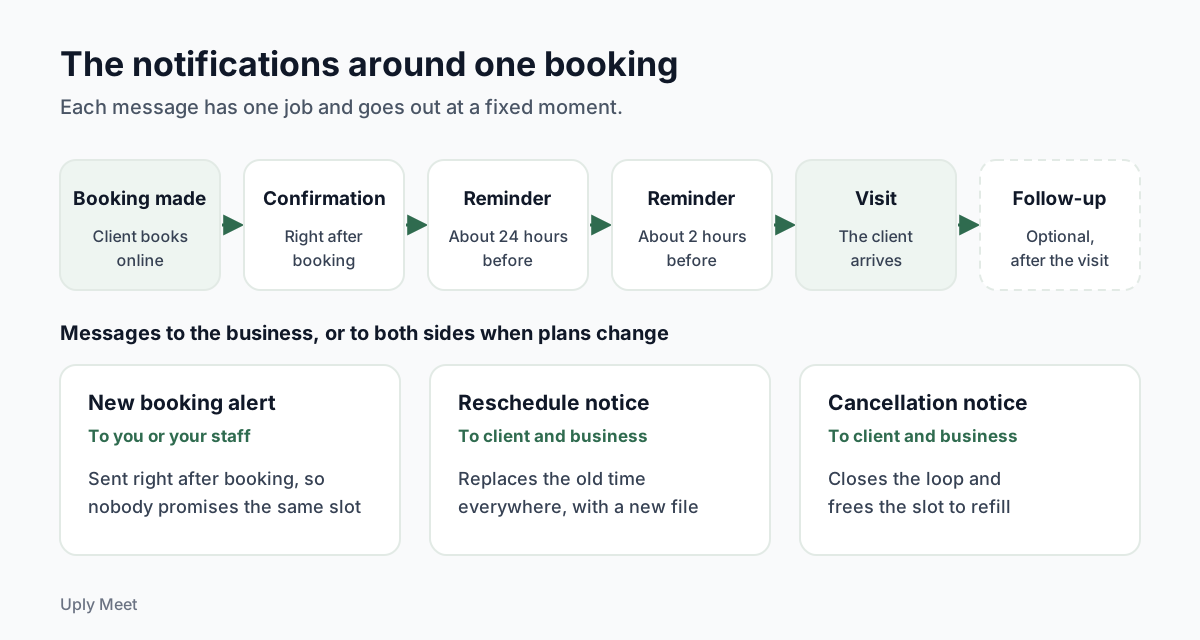
Here is the full set most service businesses need, with who receives each one and when.
| Notification | Who gets it | When it goes out | Its one job |
|---|---|---|---|
| Booking confirmation | Client | Right after booking | Prove the booking exists and give the details |
| New booking alert | Business | Right after booking | Tell you or your staff that the calendar changed |
| Reminder | Client | Before the visit, often twice | Make sure the client remembers and can still change plans |
| Reschedule notice | Client and business | When the time moves | Replace the old time everywhere |
| Cancellation notice | Client and business | When the booking is cancelled | Close the loop and free the slot |
| Follow-up | Client | After the visit (optional) | Thank the client and invite the next booking |
Client-facing notifications
Clients care about three facts: when, where and how to change it. The confirmation and the reminders carry most of the weight. Our guide to appointment confirmations covers the first message in more depth.
The follow-up is the one optional message in the set. It is useful for a thank-you or a rebooking prompt, but it should never be the place where you remind people of a visit that has not happened yet.
Business-facing notifications
The appointment notification you receive as the owner matters just as much. A solo nail tech working on a client cannot check a dashboard every ten minutes. A short alert for each new, moved or cancelled booking keeps the day predictable and stops two people from promising the same slot.
If you share a calendar with staff, decide who gets which alert. The person doing the service needs every change to their own day; the owner may only want a daily summary.
When to send each notification
Timing decides whether an appointment notification helps or just adds noise. The research on missed appointments comes from healthcare, not salons or studios, so treat the numbers as a direction rather than a promise for your business.
A systematic review of 105 studies (Dantas et al., Health Policy, 2018) found an average no-show rate of about 23% in healthcare appointment scheduling. The same review names a long lead time, meaning a booking made far in advance, as one of the most commonly reported predictors of a no-show.
Confirmations: immediately
Send the confirmation within a minute of the booking. A client who books at 11 pm and sees nothing tends to wonder whether it worked, and may book again or message you.
Reminders: the day before and a few hours before
In a meta-analysis of 21 randomised studies (Robotham et al., BMJ Open, 2016), patients who got text notifications were 25% less likely to miss their appointment (15% versus 21%), and multiple notifications worked better than a single one. That is the logic behind two reminders.
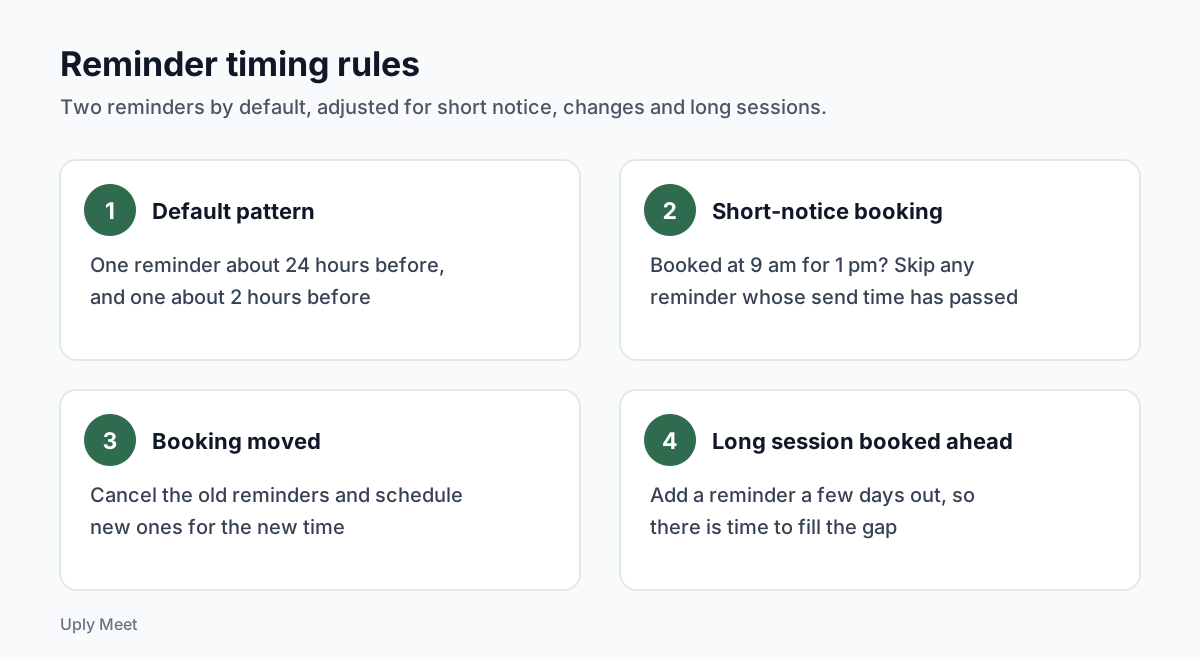
A pattern that suits most services is one reminder about 24 hours before and one about 2 hours before. The first leaves time to reschedule and refill the slot. The second catches the people who simply lost track of the day.
Long sessions are the exception worth thinking about. For a full-day tattoo or a multi-hour lash set booked weeks ahead, an extra reminder a few days out gives you time to fill the gap if the client drops out.
Bookings made at short notice
If someone books at 9 am for a 1 pm appointment, a day-before reminder makes no sense. Skip any reminder whose send time has already passed. When a booking moves, cancel the old reminders and schedule new ones, so nobody gets a reminder for a time that no longer exists.
Time zones
Write the time in the business's local time zone and name it. Good booking tools follow the IANA Time Zone Database, which tracks daylight saving changes worldwide. That matters for clients who book while travelling, and for the week the clocks change.
Email, text message or app: choosing the channel
There is no single best channel for an appointment notification. Each one trades reach against cost and effort. Here is how they compare for a small service business.
| Channel | Strengths | Weak spots | Best for |
|---|---|---|---|
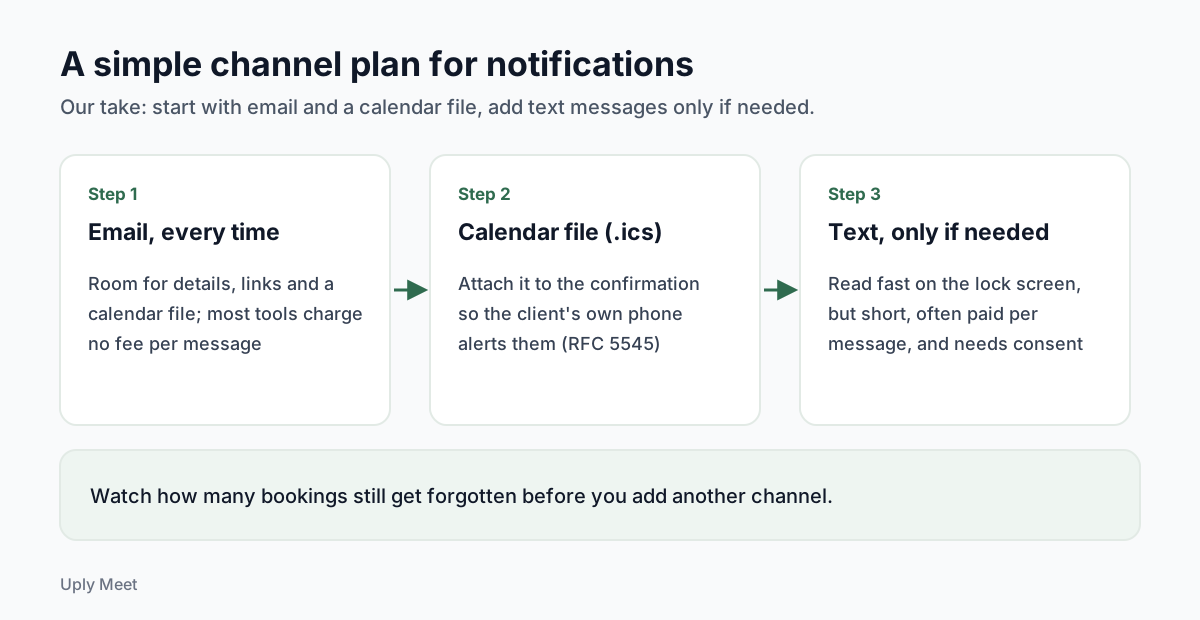
| Room for details, links and a calendar file; no per-message fee with most tools | Can be read late or filtered as spam | Confirmations, changes, reminders with details | |
| Text message | Read quickly on the lock screen | Short, often paid per message, needs consent | Short final reminders |
| App push alert | Free once installed | Only works if the client installs your app and allows alerts | Businesses with their own app |
| Calendar file (.ics) | Puts the booking in the client's own calendar | The client has to add it | Every confirmation |
The evidence for text reminders is solid. A Cochrane review (Gurol-Urganci et al., 2013) found moderate-quality evidence that text message reminders improve attendance at healthcare appointments compared with no reminder. Email is less studied, so be careful with anyone who promises a specific drop in no-shows from email alone.
Still, email does real work. One massage therapist writing on a therapists' forum credits a reminder the day before, by email or text, for having very few no-shows over 20 years.
App notifications on Android and iPhone
Asking clients to install an app just to get alerts is a big ask. One barber discussing booking apps puts it plainly: they do not want people to have to download an app just to book.
A calendar file is the lighter route. The iCalendar format (RFC 5545) is an open standard for exchanging calendar events, independent of any one calendar service. Once the booking sits in the client's calendar, their phone can alert them using the reminder settings they already chose.
Appointment notification email: what to put in it
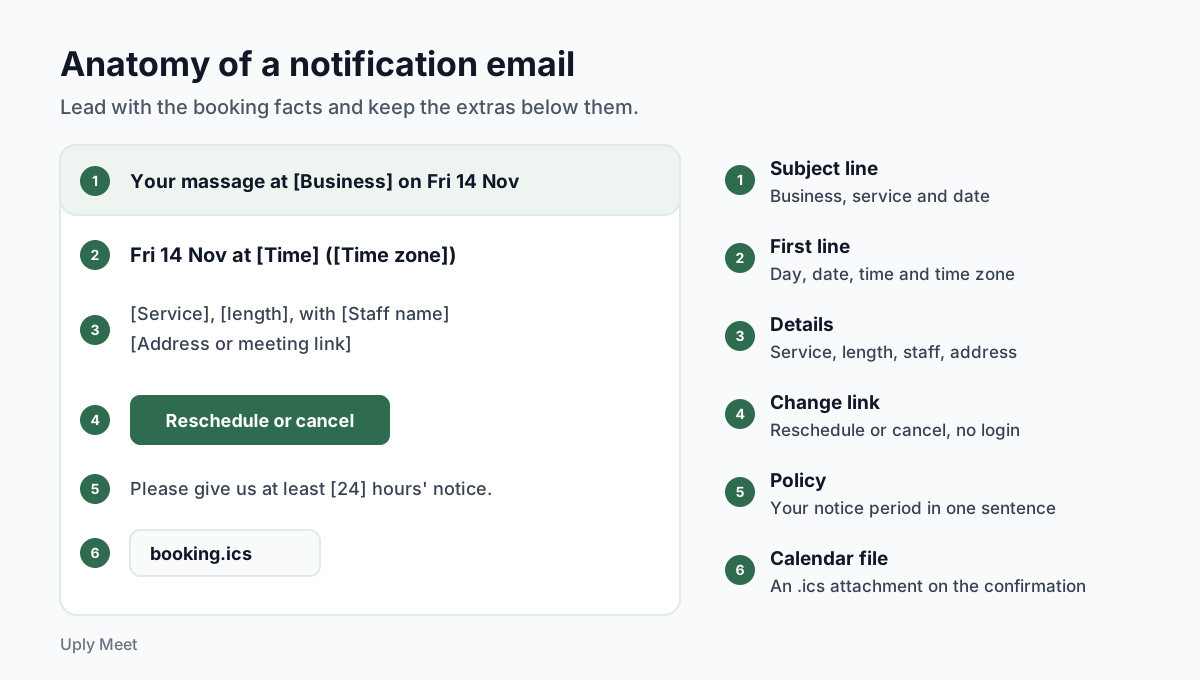
An appointment notification email has one reader in a hurry. Lead with the facts and keep the extras below them.
- Subject line: the business name, the service and the date, for example "Your massage at [Business name] on Fri 14 Nov".
- First line: the day, date, time and time zone.
- Details: service, length, staff member, address or meeting link, and the price if useful.
- Change link: one clear button to reschedule or cancel, without making the client log in.
- Policy: your cancellation notice period in one sentence.
- Calendar file: an .ics attachment so the booking lands in their calendar.
Keep it transactional
Under the US CAN-SPAM Act, a message whose primary purpose is transactional is exempt from most of the law's requirements. The FTC's compliance guide adds a catch: if the transactional content does not appear mainly at the beginning, the primary purpose of the message is treated as commercial. Put the booking first and leave promotions out of reminders.
Make sure it arrives
Gmail sets rules for anyone sending to its users. According to Google's email sender guidelines, every sender needs SPF or DKIM authentication for the sending domain and must keep spam rates reported in Postmaster Tools below 0.3%. Senders of more than 5,000 messages a day to Gmail accounts have extra rules, including DMARC.
You will rarely hit those volumes as a single studio, but your booking tool might across all its customers. Ask which domain it sends from and whether that domain is authenticated, then send yourself a test booking and check it lands in the inbox.
Appointment notification templates you can copy
These appointment notification examples are starting points, not legal text. Replace everything in [brackets] and cut anything that does not apply. Short beats clever.
Booking confirmation
Example: confirmation email
Subject: Booked: [Service] at [Business name] on [Day, date]
Hi [First name], you are booked for [Service] with [Staff name] on [Day, date] at [Time] ([Time zone]).
Where: [Address or link]. Need to change it? Use this link: [Manage link]. Please give us at least [24] hours' notice.
A calendar file is attached so you can add this to your calendar.
Reminders
Example: day-before reminder
Subject: Tomorrow at [Time]: [Service] at [Business name]
Hi [First name], see you tomorrow, [Day, date], at [Time] ([Time zone]). If plans changed, reschedule or cancel here: [Manage link].
Example: two-hour reminder
Subject: See you at [Time] today
Hi [First name], your [Service] starts at [Time] at [Address]. Running late or can't make it? [Manage link]
Changes and cancellations
Example: reschedule notice
Subject: New time for your [Service]
Hi [First name], your booking has moved to [Day, date] at [Time] ([Time zone]). The old time is cancelled. An updated calendar file is attached.
Example: cancellation notice
Subject: Cancelled: [Service] on [Day, date]
Hi [First name], your booking for [Day, date] at [Time] is cancelled. Book again any time here: [Booking page link].
Example: new booking alert for the business
Subject: New booking: [Client name], [Service], [Day, date] [Time]
[Client name] booked [Service] with [Staff name]. Note from the client: [Note or "none"].
For shorter wording built for the lock screen, see these appointment reminder text examples.
A setup checklist and common mistakes
Use this list when you set up appointment notification messages for the first time, or when you switch booking tools.
- Turn on the confirmation and the new booking alert.
- Set two reminders, roughly 24 hours and 2 hours before.
- Make sure reminders skip times that have already passed.
- Add a reschedule and cancel link to every client message.
- State your notice period in one sentence.
- Attach a calendar file to the confirmation.
- Book a test appointment with your own email and read every message on your phone.
Mistakes worth avoiding
Hiding the change link. If cancelling means a phone call, some clients just do not show up. A visible link turns a no-show into a cancellation you can refill.
Leaving out the time zone. It costs a few characters and prevents confused clients after a daylight saving switch.
Too many messages. More is not always better. The research above supports more than one reminder, not five; past a point, extra messages mostly teach clients to ignore you.
No policy behind the reminder. Reminders work best alongside a clear rule for late changes. If you are weighing a charge for missed visits, read our guide to setting a fair no show fee, and see how to handle appointment cancellation without awkward conversations.
Putting it together
A good appointment notification setup is mostly about consistency: the same clear facts, at the same moments, with a way to change plans in every message. Start with email and a calendar file, watch how many bookings still get forgotten, and only then add more channels.
If you use Uply Meet for appointment booking, the confirmation, the business alert and two email reminders, 24 hours and 2 hours before, are on by default, and clients can reschedule or cancel from the email without an account. Paid plans let you edit reminder timing and wording. See how each appointment reminder works before you turn them on.
Frequently asked questions
What is an appointment notification?
It is an automatic message about a booking, such as the confirmation, a reminder before the visit, a notice when the time changes or the booking is cancelled, or an alert to the business about a new booking.
How many reminders should I send before an appointment?
Two is a sensible default: one about 24 hours before and one about 2 hours before. A meta-analysis of clinic studies found that more than one notification worked better than a single one.
Is an email or a text message better for appointment notifications?
Text messages are read faster but are short, usually cost money per message and need the client's consent. Email carries more detail, links and a calendar file at no extra cost. Many businesses start with email and add text messages only if forgotten bookings remain a problem.
What should an appointment notification email include?
The business name, the service, the day, date, time and time zone, the address or meeting link, a link to reschedule or cancel, your notice period, and a calendar file attached to the confirmation.
Can I add promotions to appointment reminders?
It is safer not to. Under the FTC's CAN-SPAM guidance, a message whose transactional content does not come first can be treated as commercial, which brings extra rules. Keep reminders about the booking.
When should a booking confirmation be sent?
Within a minute of the booking. A client who books late at night and sees nothing tends to wonder whether it worked, and may book again or message you.
What happens to reminders when a booking is moved?
Cancel the old reminders and schedule new ones for the new time, so nobody gets a reminder for a time that no longer exists. The same logic applies to short-notice bookings: skip any reminder whose send time has already passed.
Should I attach a calendar file to appointment emails?
Yes, at least to the confirmation. A calendar file uses the iCalendar format (RFC 5545), an open standard that works across calendar services. Once the booking sits in the client's calendar, their phone can alert them with the reminder settings they already use.
Sources
- Dantas et al. (2018), No-shows in appointment scheduling: a systematic literature review, Health Policy
- Robotham et al. (2016), Using digital notifications to improve attendance in clinic: systematic review and meta-analysis, BMJ Open
- Gurol-Urganci et al. (2013), Mobile phone messaging reminders for attendance at healthcare appointments, Cochrane Database of Systematic Reviews
- Federal Trade Commission, CAN-SPAM Act: A Compliance Guide for Business
- Gmail Help, Email sender guidelines
- IETF RFC 5545, Internet Calendaring and Scheduling Core Object Specification (iCalendar)
- IANA, Time Zone Database
- r/MassageTherapists, discussion of no-show rates and reminders
- r/Barber, discussion of booking apps