
Tattoo booking confirmation: template and checklist
On this page
- What a tattoo booking confirmation should include
- How to book a tattoo appointment, from inquiry to confirmed
- Tattoo booking email templates you can copy
- Policies worth stating in every confirmation
- Reminders between the booking and the session
- Common confirmation mistakes and how to fix them
- Sending confirmations without the admin
A tattoo booking confirmation is the message a studio sends once a client's slot is locked in. It should state the date, start time and expected length, the artist, the studio address, the deposit status, the design and placement you agreed on, and the cancellation rules. Send it within minutes of the booking, in writing, so the client has one place to check every detail.
That sounds obvious, yet most confusion in a tattoo studio starts with a vague confirmation: a client who thought the deposit came off the final price, or who turned up an hour early for a consultation. This guide gives you a checklist, three email examples you can copy, and the policies worth putting in writing before the session.
What a tattoo booking confirmation should include
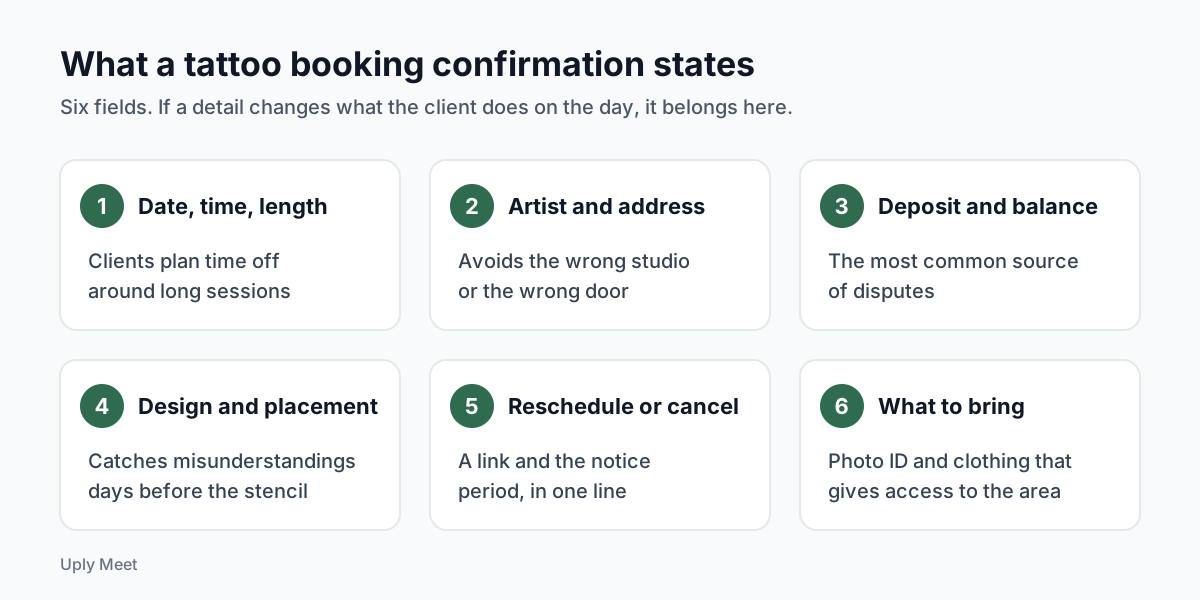
A good tattoo booking confirmation answers every question a client would otherwise text you about. Our view: if a detail would change what the client does on the day, it belongs in the email. If it would not, leave it out. A long confirmation is not a better one.
The essentials
Date, start time and how long you expect the session to run. Add the time zone when you work with clients who travel in for a guest spot. Name the artist, give the full studio address and say how to get in if the entrance is hard to find.
Deposit and balance
Say how much deposit was paid, whether it comes off the final price, and what happens to it if the client cancels or moves the date. This single line prevents more arguments than anything else in the email.
Design and placement
Restate the agreed design, rough size and placement in one sentence. It gives the client a chance to flag a misunderstanding days before the session, not while the stencil is going on.
| Field | Why it matters | Example wording |
|---|---|---|
| Date, time, length | Clients plan time off around long sessions | Saturday 14 March, 11:00, about 4 hours |
| Artist and studio address | Avoids the wrong studio or the wrong door | With Sam, 12 Example Street, side entrance |
| Deposit and balance | The most common source of disputes | Deposit received, taken off your final price |
| Design and placement | Catches misunderstandings early | Fine line peony, palm size, left forearm |
| How to reschedule or cancel | Clients who cannot change easily tend to disappear | Use the link below, at least 48 hours ahead |
| What to bring | No surprises at check-in | Photo ID and clothing that gives access to the area |
The example wording above is illustrative. Swap in your own studio details, notice period and deposit rules.
How to book a tattoo appointment, from inquiry to confirmed
Clients search for how to book a tattoo appointment because every studio does it a little differently. Spelling out your process, on your booking page and again in the confirmation, removes that uncertainty.
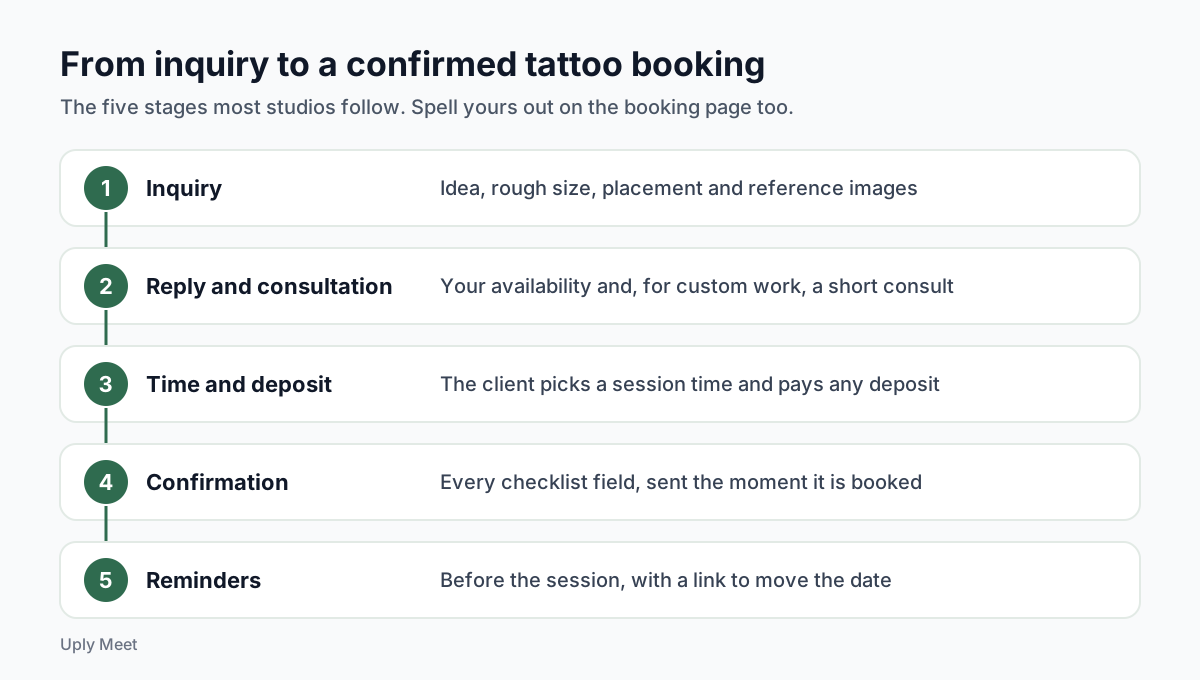
Most studios follow some version of this flow:
- The client sends an inquiry with the idea, rough size, placement and reference images.
- You reply with availability and, for custom work, a short consultation.
- The client picks a session time and pays a deposit if you take one.
- You send the confirmation with everything from the checklist above.
- Reminders go out before the session, and the client can move the date through the link if plans change.
Consultation or session?
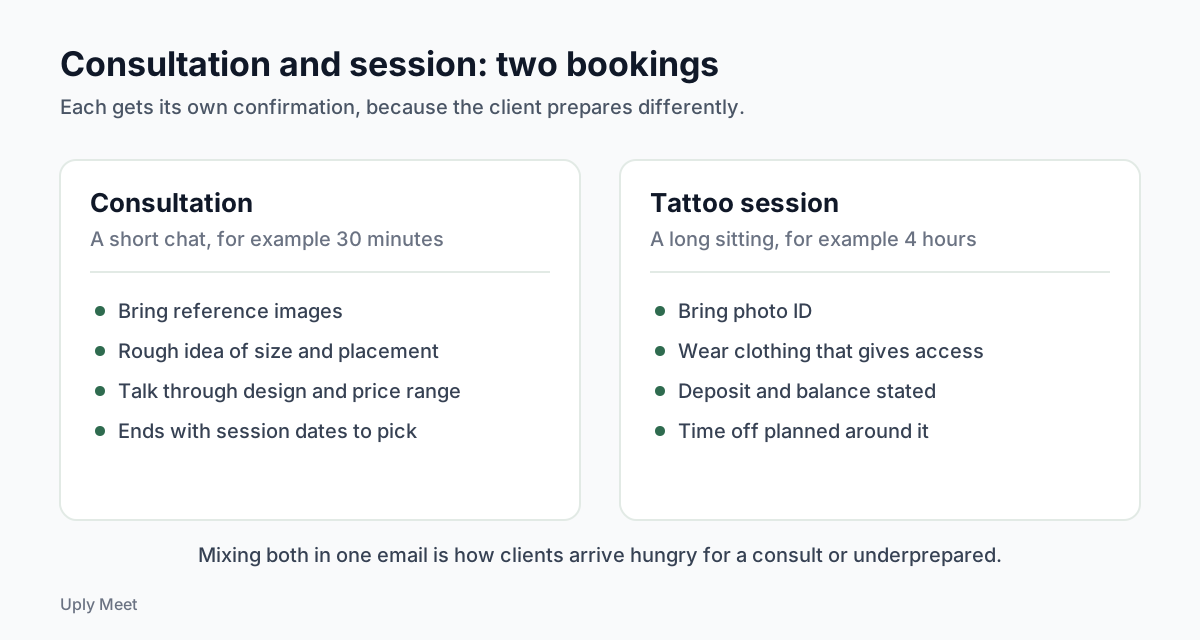
Treat the consultation and the tattoo session as two separate bookings with two separate confirmations. A 30 minute chat and a four hour session need different preparation, and mixing them in one email is how clients end up arriving hungry for a consult or underprepared for the long sitting.
When to send it
Send the confirmation the moment the booking is made, not at the end of the day. In a review of 105 healthcare studies, Dantas and colleagues (Health Policy, 2018) found that a long lead time, the gap between booking and appointment, was one of the most common predictors of a no-show. Clinic research is not tattoo research, but the logic carries over: custom pieces are often booked weeks ahead, so the written record has to do a lot of work.
Tattoo booking email templates you can copy
Each tattoo booking email example below is a starting point, not legal text. Edit the bracketed parts, keep the tone you use with clients, and read them out loud once to check they sound like you.
Session confirmation example
Subject: Your tattoo session with [Artist] is confirmed for [Day, Date]
Hi [Client name],
You are booked in with [Artist] on [Day, Date] at [Time]. Plan for about [length] hours.
Studio: [Address]. [How to find the entrance or where to park.]
Design: [Short description], [size], [placement].
Deposit: [Amount] received. It comes off your final price. The balance of about [amount or range] is due on the day.
Need to move or cancel? Use the link in this email at least [notice period] before your session. With less notice than that, [your deposit rule].
Please bring photo ID and wear something that gives easy access to the area.
See you soon,
[Artist], [Studio]
Consultation confirmation example
Subject: Consultation booked: [Day, Date] at [Time]
Hi [Client name],
Thanks for booking a [length] minute consultation with [Artist] on [Day, Date] at [Time] at [Address].
Please bring your reference images and a rough idea of size and placement. We will talk through the design, a price range and session dates.
If the time no longer works, you can change it with the link in this email.
[Artist], [Studio]
Rescheduled session example
Subject: New date confirmed: [Day, Date] at [Time]
Hi [Client name],
Your session has moved to [Day, Date] at [Time]. Your deposit of [amount] carries over to the new date.
Everything else stays the same: [design], [placement], with [Artist] at [Address].
This replaces your previous confirmation.
Notice what is missing: promotions, a newsletter signup, a discount on merch. The U.S. FTC CAN-SPAM compliance guide treats an email that confirms a transaction the client already agreed to as transactional, and warns that when that content is not mainly at the beginning, the primary purpose can count as commercial. Keep the booking details first and the marketing somewhere else.
Policies worth stating in every confirmation
Policies only work if the client saw them before paying. Putting them in the tattoo booking confirmation, and not only on your website, gives you a written record of what was agreed.
Cancellation and rescheduling notice
Pick one notice period and use it everywhere. Long custom pieces usually justify more notice than a small flash tattoo, because a cancelled four hour block is hard to refill at short notice. Say plainly what happens to the deposit inside and outside that window.
Late arrivals
State how late a client can be before the session is shortened or moved. One sentence is enough, and it saves an awkward conversation at the door.
ID and age rules
According to the U.S. Food and Drug Administration, state and local authorities oversee the practice of tattooing, so age limits and consent rules depend on where your studio is. Check your local rules, then tell clients exactly which ID to bring. A client turned away at the desk because they forgot ID is a lost slot for you too.
Reminders between the booking and the session
The tattoo booking confirmation is the first message, not the only one. When the session is weeks away, people forget, and the research on clinic appointments agrees. A Cochrane review (2013) names patient forgetfulness as one of the main reasons for missed appointments.
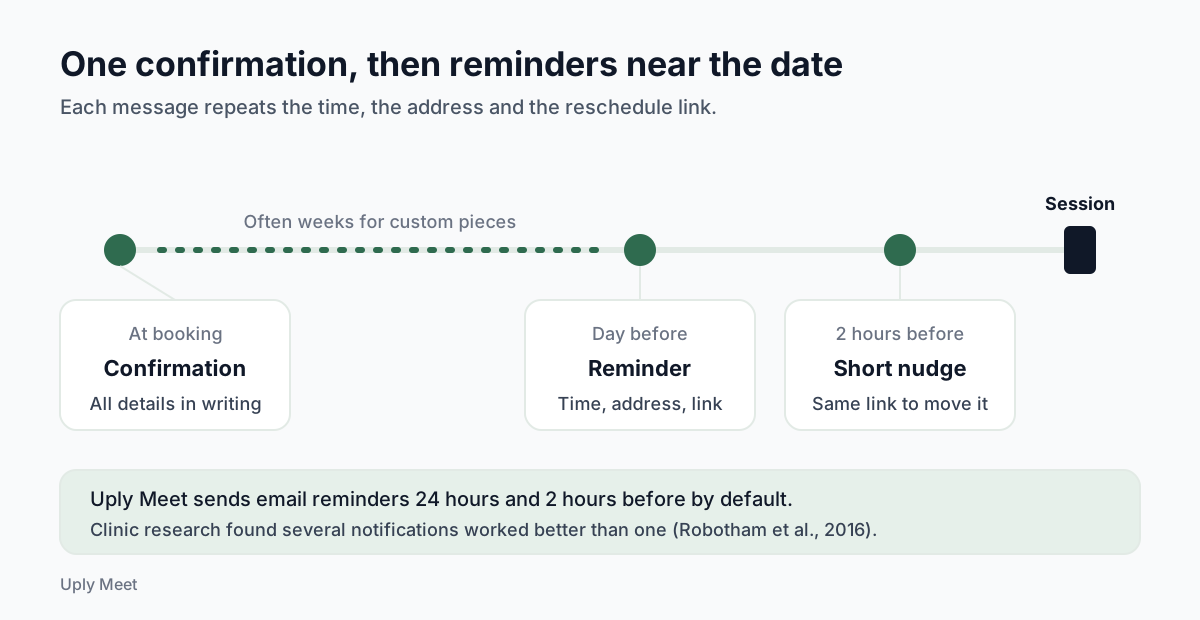
In a meta-analysis of 21 randomised studies, Robotham and colleagues (BMJ Open, 2016) found that patients who received digital notifications were 25% less likely to miss appointments (15% vs 21%), and that several notifications worked better than one. Those were clinic studies, not tattoo studios sending email, so do not expect the same number. The pattern is still useful: remind more than once, and close to the date.
Tattoo artists feel this more than most. On one forum thread about no-shows, an artist wrote: "I've had people no show on $900 tattoos." A long session that goes empty is a whole day of income.
A simple rhythm works for most studios: the confirmation at booking, an appointment reminder the day before, and a short nudge a couple of hours ahead. Each reminder should repeat the time, the address and the link to reschedule, so a client who cannot make it moves the date instead of going quiet.
Common confirmation mistakes and how to fix them
Most problems with a tattoo booking confirmation are not about tone. They come from a detail that was missing, out of date or buried. Before you send the next one, check it against these five mistakes.
A subject line that hides the date
"Booking confirmed" tells the client nothing when they search their inbox three weeks later. Put the artist, the day and the date in the subject line, as the examples above do. A client who can find the email in seconds is less likely to message you to ask for the time again.
Leaving an old confirmation in place after a change
When a session moves, send a new confirmation and say clearly that it replaces the previous one. Otherwise the client has two emails with two dates, and the one they open on the day may be the wrong one. Restate the deposit too, so there is no doubt that it carried over to the new date.
One email for a piece that needs several sittings
Large work often runs over more than one session. Confirm each sitting as its own booking, with its own date, start time and expected length, in the same way you keep the consultation and the session apart. Say in each email how the deposit applies, for example whether it comes off the first sitting or the last one, so the client knows what is due on which day.
A missing time zone or address for a guest spot
When you work a guest spot, or a client travels in from another city, a start time without a time zone and a studio name without a full address are easy to misread. Write both in full, and add how to find the entrance, because the building is new to the client and possibly to you as well.
Details buried under marketing
If the first thing a client sees is a flash sale or a merch link, the date and the deposit rule get skimmed past. Keep the booking details at the top, in line with the FTC guidance above, and save promotions for separate messages. A confirmation that reads like a receipt is the one clients actually keep.
Sending confirmations without the admin
Writing every confirmation by hand works until the studio gets busy. After that, the details start to drift: a wrong date copied from last week, a missing deposit line. Good tattoo software fills in the same fields of every tattoo booking confirmation straight from the booking itself.
Uply Meet is one option built for this. Clients pick a time on your booking page, and the system emails a confirmation with the booking details, a calendar file in the standard iCalendar format (RFC 5545) and a link to reschedule or cancel without creating an account. Reminders go out 24 hours and 2 hours before by default, and the database refuses a second booking for the same artist at an overlapping time, so two clients cannot land in one slot.
Be clear about the limits too. Uply Meet reminders are email only. Deposits and custom booking questions, such as an age confirmation, are marked Coming soon, so for now you would take deposits the way you do today and mention them in your own message. If you want to see the flow first, start with the free appointment booking page and book a test session with yourself.
Frequently asked questions
What should a tattoo booking confirmation include?
The date, start time and expected length, the artist, the studio address, the deposit amount and whether it comes off the final price, the agreed design and placement, how to reschedule or cancel, and what to bring, such as photo ID.
When should a tattoo studio send the confirmation?
Right after the booking is made, while the details are fresh. Then send reminders closer to the date, for example the day before and a couple of hours before the session.
Should the deposit terms be in the confirmation email?
Yes. State how much was paid, whether it is taken off the final price and what happens to it if the client cancels or reschedules. It is the line most likely to prevent a dispute later.
How do I book a tattoo appointment as a client?
Contact the studio or artist with your idea, size, placement and reference images, book a consultation if they offer one, then pick a session date and pay any deposit. Keep the confirmation email, because it holds the date, deposit and cancellation rules.
Can Uply Meet take tattoo deposits?
Not yet. Deposits are marked Coming soon. Uply Meet currently handles the booking page, confirmation emails, email reminders and self-service rescheduling and cancellation.
Should a tattoo consultation and the tattoo session get separate confirmations?
Yes. Treat them as two bookings with two confirmations. A short consultation and a long session need different preparation: reference images and a rough idea of size and placement for the consult, photo ID, suitable clothing and the deposit terms for the session.
What should a rescheduled tattoo session confirmation say?
The new day, date and time, that the deposit carries over to the new date, the design, placement, artist and address, and a clear line that this email replaces the previous confirmation, so the client does not follow the old date.
Can I add promotions to a tattoo booking confirmation?
It is better not to. The FTC CAN-SPAM guide treats an email that confirms a transaction the client agreed to as transactional, but warns that the primary purpose can count as commercial when that content is not mainly at the beginning. Keep the booking details first and send marketing separately.
Sources
- Dantas et al. (2018), No-shows in appointment scheduling: a systematic literature review, Health Policy
- Robotham et al. (2016), Using digital notifications to improve attendance in clinic, BMJ Open
- Gurol-Urganci et al. (2013), Mobile phone messaging reminders for attendance at healthcare appointments, Cochrane Review
- U.S. FDA, Think Before You Ink: Tattoo Safety
- U.S. FTC, CAN-SPAM Act: A Compliance Guide for Business
- RFC 5545, Internet Calendaring and Scheduling Core Object Specification (iCalendar)
- r/TattooArtists forum thread: No shows